75% less time on court documents
A legal services company that helps law firms manage court documents and legal notices. Built after seeing how much time legal teams waste on paperwork that AI could handle better.
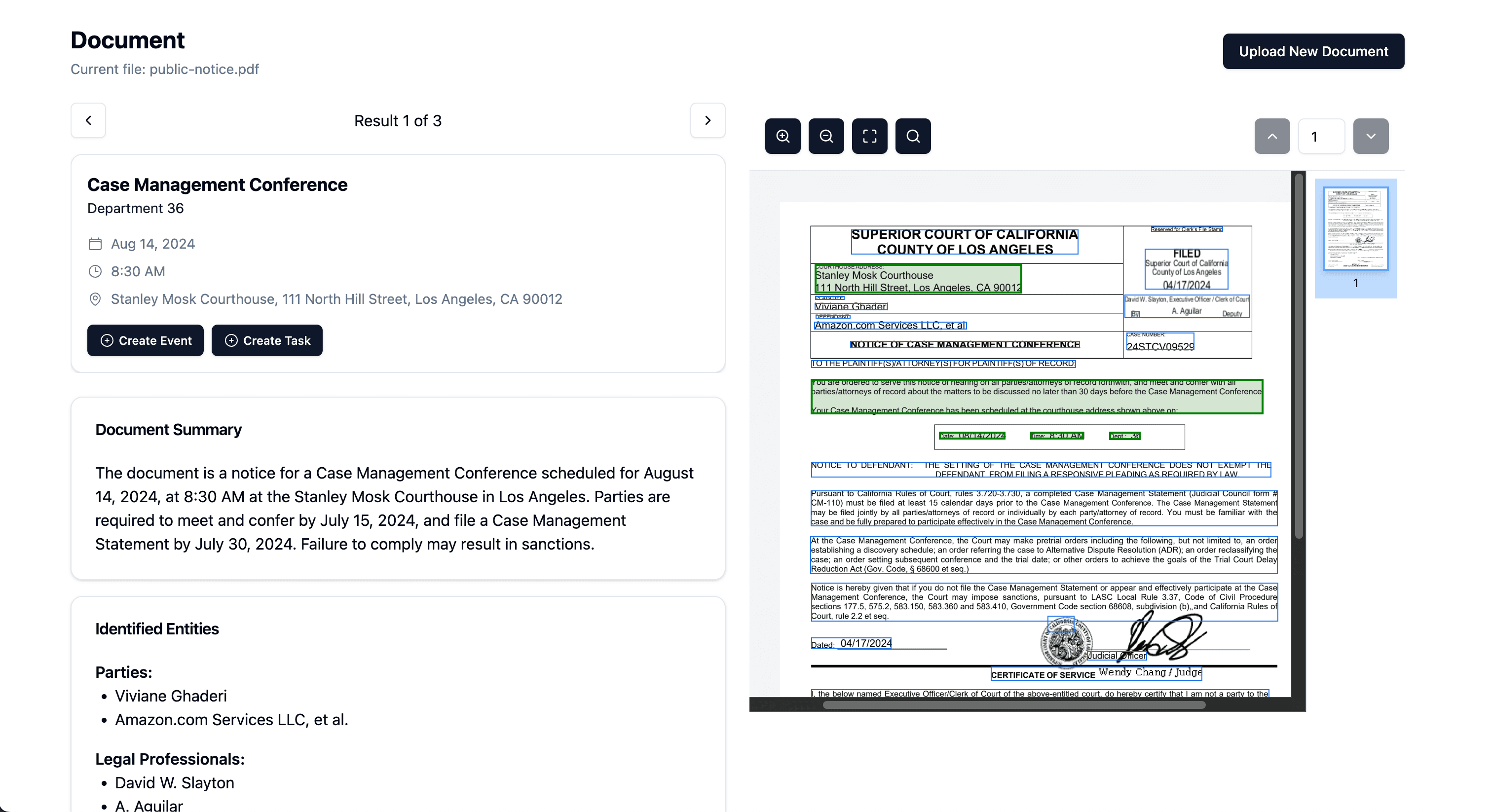
The Problem
Every time a court notice arrives, someone at a law firm has to read through it, find the important dates and deadlines, then manually enter them into a calendar and task management system. On top of that, attorneys need to produce narrative summaries and medical documentation, each with different formatting requirements and compliance standards. For a single case, this can eat up hours. Multiply that across dozens of active cases, and you have attorneys spending more time on admin work than actual legal work. Deadlines get missed. Summaries are inconsistent. And the more a firm grows, the worse it gets.
Our Approach
- 01
Mapping the Work
Before writing a line of code, we studied how legal teams actually operate: reading court notices, extracting deadlines, writing case narratives, producing medical summaries. Each task had different requirements: speed, accuracy, compliance, tone. This audit shaped the entire platform design.
- +Identified 4 distinct workflow types with different AI needs
- +Mapped compliance requirements for medical documentation
- +Studied existing legal tools and review processes
- +Defined success criteria for each workflow
- 02
Choosing the Right Model for Each Job
This is where our approach differs. Instead of forcing one AI model to do everything, we matched each task to the model best suited for it. AWS for document reading and OCR, which is fast, reliable, and handles poor scan quality. GPT for the scheduling assistant, which is good at understanding context and pulling structured data like dates and tasks. Gemini for narrative summaries, which generates coherent, well-structured writing from case notes. Azure OpenAI on private cloud for medical summaries: same AI quality, running in a HIPAA-compliant environment.
- +AWS OCR for document reading across all formats
- +GPT for intelligent schedule and deadline extraction
- +Gemini for narrative case summaries
- +Azure private deployment for HIPAA-compliant medical docs
- +Each model chosen for its specific strengths
- +Models can be swapped as better options emerge
- 03
Built to Fit How Attorneys Already Work
The biggest risk with any new tool is that nobody uses it. The platform plugs directly into the calendar, task management, and document systems law firms already have. Attorneys don't need to learn anything new. Deadlines show up where they already look. Summaries land where they already review them. One-click approval, and they're back to practicing law.
- +Syncs directly with existing calendar and task tools
- +Summaries delivered in the formats attorneys already use
- +One-click review and approval workflow
- +No new software to learn or dashboards to check
Results & Impact
Legal teams went from spending most of their day on paperwork to spending most of it on actual legal work. Document processing time dropped by 75%, and the same teams now handle three times the volume. Every extracted deadline goes through an attorney before it hits the calendar, so missed deadlines are essentially a thing of the past. The multi-model architecture means the platform isn't locked into any single AI provider. As models improve, the platform improves with them.
Under the hood
- +Multi-model architecture, so each AI handles what it's best at instead of one model doing everything
- +HIPAA-compliant private cloud deployment for all medical documentation
- +Processes multiple documents simultaneously during high-volume filing periods
- +End-to-end encryption across all document handling
- +System designed so models can be upgraded or swapped without disrupting the workflow